Tag: Effective Use of EMRs

  • Members invited to participate in Communities of Practice for Telus PS, OSCAR, Accuro, and P&P EMRs

    What is an EMR Community of Practice (CoP)?

    An EMR CoP is a group that seeks to optimize use of their EMR. We do this by continuously engaging EMR vendors, super-users, clinicians, QIDS Specialists and other team members to strengthen collective knowledge, expertise and problem solving capability in EMR offerings. Our EMR Communities of Practice collaborate closely with vendors to improve their understanding of AFHTO member requirements and to facilitate resolution of common problems in a mutually-agreed priority order. Several success stories have emerged from the EMR CoPs, illustrating the role they play in the spread of improvements, change in behaviours and expectations, and impact beyond their own boundaries. Unlike most EMR user groups, the communities of practice have the following characteristics:

    • Equality among members
    • Focus on issues in common
    • Led by users (QIDS Specialists, physicians, etc.)
    • Priorities set collectively via action item list
    • Problems solved collaboratively through sharing of best practices
    • Accountable to the community
    • Their own social networking platform
    • Regular meetings (via web or teleconference)

    Goals of the EMR Communities of Practice

    • Leverage the wisdom of the field
    • Change conversations with EMR vendors to expedite improvement
    • Identify data extraction tools and processes

    AFHTO members and staff support 4 EMR Communities of Practice:

    • Accuro
    • OSCAR
    • P&P
    • TELUS PS

    Want to join an EMR CoP? Please contact us for more information.      

  • Standardized EMR Queries

    Standardized Clinical Queries Algorithm Project Value of Consistent Clinical Data


    NOTE: All queries are tested and validated prior to release. However, changes that take place after the queries are released may affect how accurate they are.  Such changes could include EMR software updates, new medications, and changes to standard clinical definitions. They may result in false positives, that is, patients being flagged who do not have the specified condition. They may also result in false negatives, that is, patients not being flagged who do have the condition. Queries are also limited by the quality of your EMR data. Please exercise judgement when using them, as they are meant to support and complement a chart review, not to replace it. 
     

    Standard Clinical Queries

    Standardized queries are used to consistently identify patients in your EMR. QIDS Specialists have developed the following queries and are sharing them with teams that do not have patient lists for specified conditions. These queries are presented for your consideration and will be subsequently reviewed by the EMR Data Management committee.

    These queries were developed by the Algorithm Project and extend the work of the ALIVE project. The queries are based on the formally tested case definitions developed and published by CPCSSN and EMRALD to extend that knowledge to all EMR users.

    Algorithm Project

    The Algorithm Project team is a small group of QIDS Specialists whose goal is to develop, test, and deploy standard EMR queries. With the aim to enhance the ability of all teams to extract and analyze EMR data in order to facilitate data clean-up initiatives and to support conversations about improvement.

     
    Most recently, the team has been working on standardized queries for opioid use for several EMRs. Queries to identify patients with a current prescription for opioids or concurrent prescriptions for opioids and benzodiazepines are now available for Telus PS Suite, OSCAR, and Accuro by QHR. A query to identify patients with one or more prescriptions for opioids that have a high total morphine equivalent (high MEQ) is currently available for OSCAR and is in development for Telus PS Suite and Accuro by QHR.


    The list below links the chronic conditions listed above, for which EMR queries have already been developed, as well as for several other chronic conditions for which standardized case definitions are available. Links in the table will direct you to the queries (where available) and the sources of the case definitions. 

    What is the value of consistent clinical data?

    By having consistent clinical data in your EMR, you can empower your team to:

    • Run consistent searches for multiple disease conditions across multiple EMRs.
    • Easily and consistently identify correct patients not previously identified as having these conditions.
    • Offer early treatment, hopefully mitigating disease progression.
    • Improve patient outcomes.
    • Reduce costs to the healthcare system.
  • EMR tools and queries for phone encounters (to help you track 7-day follow-up)

    Tracking Phone Encounters: An Essential Step in Tracking Follow-Up After Hospitalization

    In D2D 5.0, Follow-Up after Hospitalization was introduced as a core indicator. The D2D definition differs from the Ministry of Health and Long-Term Care definition, which is based on billing data, includes only in-office visits with physicians, and does not take into account that timely discharge information may not be available. Based on input from AFHTO members, the D2D definition of this indicator is “% of those hospital discharges (any condition) where timely (within 48 hours) notification was received, for which follow-up was done (by any mode, any clinician) within 7 days of discharge.” While different teams may have different approaches to tracking this indicator, an important first step for many teams is to track phone encounters. Below we have listed a number of tips, tricks and tools, including EMR queries, that can be used for this.

    Please note:

    • Reason for phone call: we are NOT looking for calls about lab results, appointment reminders, invitations to programs, appointment bookings etc.
    • Access to hospital data: we recognize that access to hospital discharge data may be a challenge and continuing efforts to improve this.
    • We are not looking for unique patients – a patient may have had a number of hospitalizations and discharges requiring follow-up care, depending on their condition and care plan.
    • Please refer to the EMR specific instructions below to generate data for phone encounters. A number of different options are presented. Once you have decided which tools to use, consider sharing your choices, challenges and successes with your EMR Communities of Practice or with the QIDS team so we can all get better at doing this!
    • This definition is comprehensive and may be unattainable at first. The tools and queries below will help your teams get started at documenting and extracting phone encounter data in a consistent way. The queries will be refined as workflows become established, EMR functionality improves, and more meaningful data becomes available.

    EMR Tips and Tools for Extracting Phone Encounter Data

    Telus PS

    Using an appointment scheduler to track phone encounters:

    Using an encounter assistant to track phone encounters:

    Using custom forms and custom queries to track phone encounters:

    Accuro

    Using encounter type (headers) to track phone encounters:

    Using appointment type to track phone encounters:

    Using shadow billing codes to track phone encounters

    Nightingale

    Using encounter type to track phone encounters:

    OSCAR

    Using fake billing codes” to track phone encounters:

    Using eForms to track phone encounters:

    Using appointment type to track phone encounters:

    • Does your team do this? if so, please connect with us or the OSCAR CoP.

    P&P

    Using shadow billing to track phone encounters:

    • A guide on how to use and query shadow billing is under construction.

    Please review the options in this guide that the P&P CoP is investigating for tracking phone encounters – there is lots more work to be done, queries to be written! Contact us if you’d like to help. This guide describes how to use day sheet reports to track post-hospital visits. Can we modify it to capture post-hospital phone encounters? Contact us if you think this might work!  

  • EMR queries for D2D – EMR Data Quality: Coded Diagnosis – Depression

    The EMR queries below were developed by QIDSS and the EMR Communities of Practice to help you extract data for submission to D2D.

    Telus PS Accuro Nightingale OSCAR P&P


    NOTE: All queries are tested and validated prior to release. However, changes that take place after the queries are released may affect how accurate they are.  Such changes could include EMR software updates, new medications, and changes to standard clinical definitions. They may result in false positives, that is, patients being flagged who do not have the specified condition. They may also result in false negatives, that is, patients not being flagged who do have the condition. Queries are also limited by the quality of your EMR data. 

    Telus PS

    The D2D EMR Data Quality Depression Coded v1 searches (.srx files) will extract data necessary to calculate the percent of patients with depression whose diagnosis is recorded with a code in the appropriate place in the EMR. Save these searches to your desktop and import into your EMR. You might need the help of your QIDSS, IT staff or other person who usually run queries in your EMR. This guide provides instructions on how to import the searches into your EMR. Screenshots of the query can be found here. Share you challenges and successes with improve@afhto.ca.

    Accuro 

    Please find the D2D EMR Data Quality Depression Coded v1 numerator and denominator queries on Publisher. You might need the help of your QIDSS, IT staff or any other person who usually run queries in your EMR. Share you challenges and successes with us.

    Nightingale 

    The D2D EMR Data Quality Depression Coded query has not been developed for Nightingale.

    OSCAR 

    Download the D2D EMR Data Quality DepressionCoded v2 queries to your computer and import into your EMR. You might need the help of your QIDSS, IT staff or any other person who usually run queries in your EMR. Share your challenges and successes with improve@afhto.ca.

    P&P 

    The D2D EMR Data Quality Depression Coded query has not been developed for P&P. Please contact improve@afhto.ca if you have a query for P&P that you’d like to share or if you have any suggestions for this work.

  • EMR queries for D2D – EMR Data Quality: Coded Diagnosis – COPD

    The EMR queries below were developed by QIDSS and the EMR Communities of Practice to help you extract data for submission to D2D.

    Telus PS Accuro Nightingale OSCAR P&P


    NOTE: All queries are tested and validated prior to release. However, changes that take place after the queries are released may affect how accurate they are.  Such changes could include EMR software updates, new medications, and changes to standard clinical definitions. They may result in false positives, that is, patients being flagged who do not have the specified condition. They may also result in false negatives, that is, patients not being flagged who do have the condition. Queries are also limited by the quality of your EMR data. 

    Telus PS 

    The D2D EMR Data Quality COPD Coded v1 searches (.srx files) will extract data neccessary to calculate the percent of patients with diabetes whose diagnosis is recorded with a code in the appropriate place in the EMR. Save these searches to your desktop and import into your EMR. You might need the help of your QIDSS, IT staff or other person who usually run queries in your EMR. This guide provides screenshots of the searches along with instructions on how to import the searches into your EMR. Share you challenges and successes with the Telus PS CoP or contact us.

    Accuro 

    Please find the D2D EMR Data Quality COPD Coded v1 numerator and denominator queries on Publisher. You might need the help of your QIDSS, IT staff or any other person who usually run queries in your EMR. Share you challenges and successes with the Accuro CoP or contact us.

    Nightingale 

    The D2D EMR Data Quality COPD has not been developed. Please contact us if you have a query for P&P that you’d like to share or if you have any suggestions for this work.

    OSCAR 

    Download the D2D EMR Data Quality COPD Coded v1 queries to your computer and import into your EMR. You might need the help of your QIDSS, IT staff or any other person who usually run queries in your EMR. Share your challenges and successes with the OSCAR CoP or contact us.

    P&P 

    The D2D EMR Data Quality COPD has not been developed. Please contact us if you have a query for P&P that you’d like to share or if you have any suggestions for this work.

  • EMR queries for D2D – EMR Data Quality: Coded Diagnosis – CHF

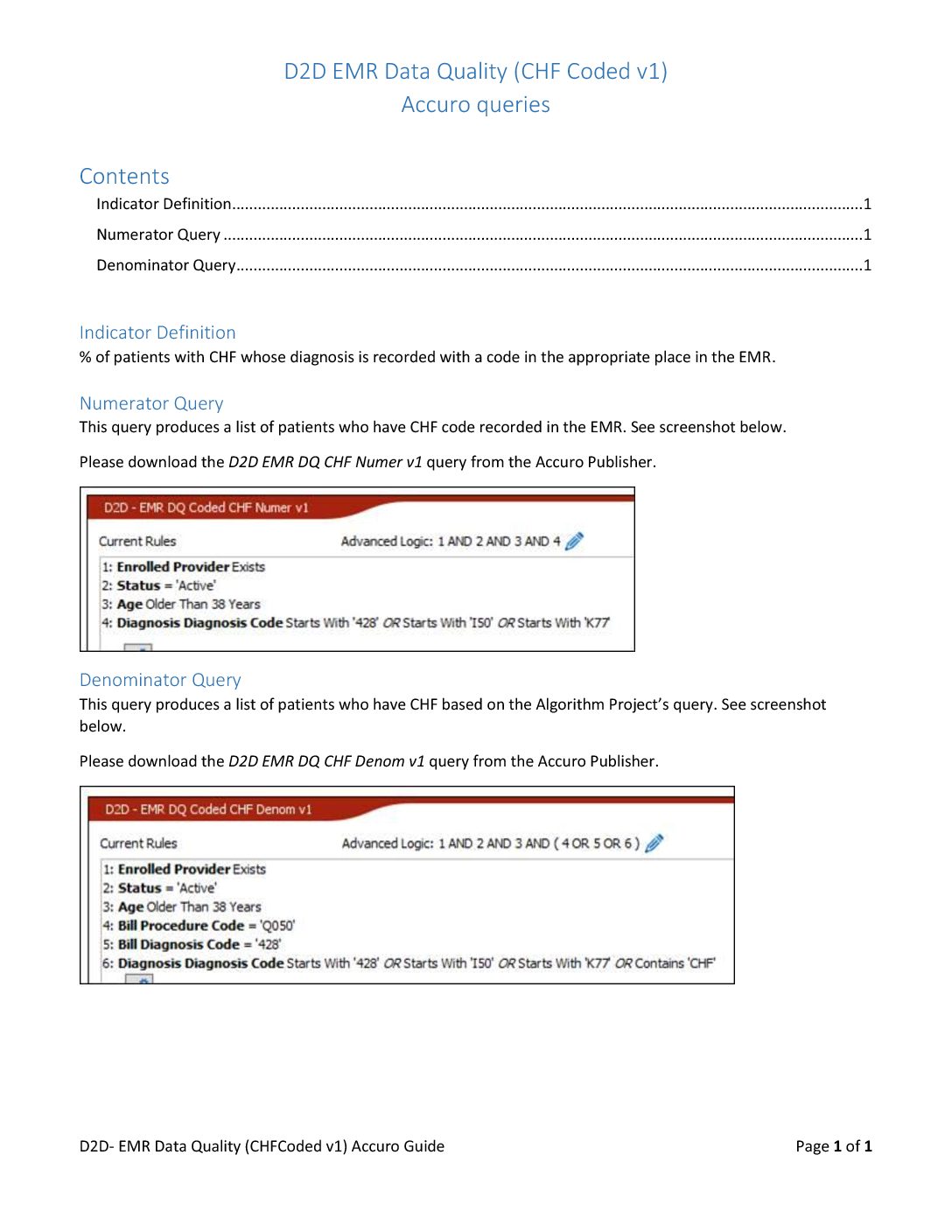
    The EMR queries below were developed by QIDSS and the EMR Communities of Practiceto help you extract data for submission to D2D.

    Telus PS Accuro Nightingale OSCAR P&P


    NOTE: All queries are tested and validated prior to release. However, changes that take place after the queries are released may affect how accurate they are.  Such changes could include EMR software updates, new medications, and changes to standard clinical definitions. They may result in false positives, that is, patients being flagged who do not have the specified condition. They may also result in false negatives, that is, patients not being flagged who do have the condition. Queries are also limited by the quality of your EMR data.

    Telus PS 

    The D2D EMR Data Quality CHF Coded v1 searches (.srx files) will extract data necessary to calculate the percent of patients with diabetes whose diagnosis is recorded with a code in the appropriate place in the EMR. Save these searches to your desktop and import into your EMR. You might need the help of your QIDSS, IT staff or other person who usually run queries in your EMR. This guide provides screenshots of the searches along with instructions on how to import the searches into your EMR. Share you challenges and successes with the Telus PS CoP or contact improve@afhto.ca.

    Accuro 

    Please find the D2D EMR Data Quality CHF Coded v1 numerator and denominator queries on Publisher. You might need the help of your QIDSS, IT staff or any other person who usually run queries in your EMR. Share you challenges and successes with the Accuro CoP or contact us.

    Nightingale 

    The D2D EMR data quality CHF coded denominator query has not been developed. Please contact us if you have a query for Nightingale that you’d like to share or if you have any suggestions for this work.

    OSCAR 

    Download the D2D EMR Data Quality CHF Coded v1 queries to your computer and import into your EMR. You might need the help of your QIDSS, IT staff or any other person who usually run queries in your EMR. Share your challenges and successes with the OSCAR CoP or contact improve@afhto.ca.

    P&P 

    The D2D EMR Data Quality Diabetes Coded query has not been developed. Please contact us if you have a query for P&P that you’d like to share or if you have any suggestions for this work.

  • Individualized HbA1c Targets

    Why?

    Better care for patients with diabetes

    Standardized HbA1C targets do not take into account the complexity and diversity of our patient populations. Even targets that vary by age may not be sufficiently flexible; for example, a frail elderly person should have a higher target than a relatively robust person, even if their age is the same. Developing individualized targets that treat patients as individuals with unique circumstances and needs allows us to ensure that we are delivering the right care to each patient.

    Better measurement of diabetes care

    Simply put, using individualized targets allows us to count how many patients are getting the right care for diabetes, not just how many are meeting an arbitrary standard. One doctor noticed that in her own practice, only 65% of her patients met the standardized target of 0.07% HbA1C. However, when the metric was applied to individualized targets, 71% of her patients were at target. Indicators based on standardized targets fail to reflect the patients who are receiving the right care, when the right care means meeting an HbA1C level that is higher than the standardized target.

    How?

    Several teams have been working on tools to enable the recording and tracking of individualized HbA1C in their EMRs. Some of these are available for use now, and others are still in testing.

    • Denis Tsang, RD at CareFirst FHT, has developed an Encounter Assistant with two checkboxes for HbA1C targets: A1C <0.07 or A1C 0.071-0.085. Clinicians can check off either box after discussion with the physician responsible for determining the patient’s target. The individualized target is then appended to the patient’s cumulative patient profile and visible to all care providers. It is available for download from the Telus Community Portal.
    • Kevin Samson, Physician IT Lead, and Hope Latam, former QIDS Specialist, East Wellington FHT, developed a diabetes-management dashboard which works directly within Telus PS EMR. It provides a summary of each patient’s diabetes management and functions as a “report card” that the doctor can share with the patient. It provides at-a-glance data for the patient’s most recent HbA1C and other diabetes care indicators (creatinine, cholesterol). When an indicator is not within the target range, it shows up in red. By default, the dashboard uses standard targets (e.g.,  07% for HbA1C), but a clinician can easily override this with an individualized value that reflects the right care for that patient. Once this is done, the form will compare the most recent HbA1C value against the individualized target to determine whether the patient is in or out of target. It is currently in testing at two FHTs and will be shared with other users of Telus Practice Solutions once complete.

    Consider raising this as an issue at your EMR Community of Practice, and pressure your vendor to develop a solution. Meanwhile, clinicians can use the “notes” field to start recording individualized HbA1C targets in each patient’s chart. See if your team can agree on a consistent format for this, so any team member can recognize it easily.

  • QIDS Specialists access to the EMR Progress Assessment tool: An AFHTO & OntarioMD collaboration

    The OntarioMD/AFHTO EPA collaboration is a project designed to provide QIDS Specialists access to a customized version of the OntarioMD EMR Progress Assessment (EPA). The EPA can then be employed by physicians to assess their current and desired level of EMR maturity. The EPA helps identify areas of improvement and serves as a starting point for conversations about EMR optimization, both at the individual and practice level. The results of the EPA act as a benchmark from which physicians, QIDS Specialists and OntarioMD Practice Enhancement Consultants (PECs) can begin developing a plan to increase practice efficiency and clinical quality. members Objectives

    • Promote the EPA within your FHTs.
    • Assist physicians with EPA completion.
    • Promote EMR Practice Enhancement Program (EPEP) and PEC services.
    • Prepare to work collaboratively with PECs to assist with data capture work.
    • Help support and sustain change (i.e., tools, custom forms, stamps, macros, etc.).

    How to Get Access to the EPA

    Step 1 – Get a Sponsored Account

    • Identify a physician and approach them about becoming your sponsor.
    • Explain the EMR Progress Assessment (EPA) initiative and provide them with a copy of the Sponsored Accounts – Physician Guide.
    • Advise that OntarioMD will provide support throughout the Sponsored Account process.
    Step 2 – Create a Portal Account

    Step 3 – Register for the EPA Webinar

    • OntarioMD will host an online training session to discuss the EPA, the practice/physician engagement process, and answer any questions about this initiative.
    • Session dates will be announced as new accounts are created.
    Step 4 – Ask Questions

    See the attached guides for creating an OntarioMD sponsored account:

    Not sure how to get started? Find a Champion

    • Use your existing relationships within the practice to identify someone willing to complete and promote the EPA to the group (e.g. Executive Director, Lead MD, EMR Champion).

    Create Awareness

    • Educate the group about the benefits of the EPA.
    • Share the results of your EPA to raise awareness and inspire the group to complete their own.
    • Promote the OntarioMD EMR Practice Enhancement Program and Peer Leader Program as services which use the EPA as a starting point in their optimization work.

    Provide Support

    • Advise and re-assure the group that you can support their completion of the EPA (i.e., interpreting the clinical questions, rating EMR maturity, etc.).

    Engage OntarioMD

    • PECs are ready to work collaboratively with QIDS Specialists and the practice on EMR enhancement projects to bridge the gap between “Where I am Now” and “Where I Want to be Next”.
  • Getting started on a CHF registry

    AFHTO has developed a standardized query to help you build a chronic disease registry for patients with Congestive Heart Failure (CHF) in your EMR. A chronic disease registry is an important step towards identifying – and ultimately correcting – gaps in care. The instructions below will help you get started.

    Why CHF?

    Congestive heart failure is the leading cause of hospitalization among older Canadians.  It also is the most common cause of re-admissions to hospital.  Being able to identify CHF patients can help you help them stay healthier and out of hospital as much as possible.  This is good for patients and for the healthcare system, which spends nearly half a billion dollars on CHF care every year. The CHF query is intended for teams that do not yet have a reliable list of CHF patients.  It will help you identify these patients if you don’t have the time or resources to start from scratch in reviewing all your patients   Right now, the query is only available for teams with PSS or Accuro.  (Work is continuing to expand the standardized query to OSCAR and Nightingale). Our CHF search tool has been built from the ICES EMRALD case definition, and then tested, revised, and validated using the eHealth Centre of Excellence EMR environment. This search does not require any data cleaning prior to use. The search process is reasonably accurate in that if it identifies 100 patients, 74 of those patients will actually have  CHF.  In a typical primary care practice of about 2000 patients, the search will likely identify 60.  You will still have to review these 60 patient charts to be 100% sure (vs. 74% sure) which ones actually have CHF.  However, this is much less work than reviewing all 2000 patients!

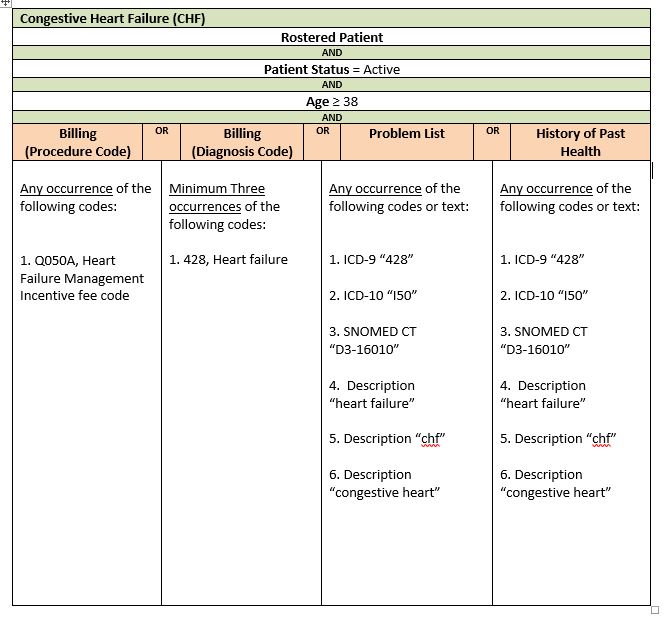
    Query Criteria
    members

    Steps to complete your query

    The following steps will help your team use the query to generate a list of CHF patients, starting from your EMR.

    Step 1. Estimate how many patients you think this will affect.  Multiply the number of patients your team serves by 0.03 (the estimated rate of CHF prevalence in Ontario) to get a rough idea of how many of your patients likely have CHF.  If the resulting estimate is a manageable and meaningful number of patients for your team to build a registry of, carry on to step 2.

    Step 2Import the query into your EMR.  Right now, you can only do this if have either Telus PSS,  QHR Technologies Accuro or OSCAR EMRs.  You will likely need the help of your QIDSS, IT staff or other person who usually works with your EMR to do this.

    • For PSS, click here to import the PSS SRX file into your EMR
    • For Accuro, download the query “AFHTO CHF Frontend Search from their publisher.

    Step 3.  Run the query in your EMR. Again, you might need the help of your QIDSS, IT staff or other person who usually runs queries in your EMR.  Running the query will produce a list of patients with CHF.  The list will not be perfect – probably 25% of the patients identified by the query will NOT have CHF.  The query gets you STARTED in building the CHF registry but doesn’t do the whole job for you.

    Step 4. Find the patients who might not have CHF. Review the list of patients generated by the query to separate out those patients that are clearly already coded as having CHF.  What’s left will the list of patients who MIGHT have CHF based on other data in the EMR besides formal coding.

    Step 5. Prepare your physicians to review the list. Subdivide the list of possible CHF patients into separate, shorter lists for each physician.  Work with your physicians to find out if they would prefer a list on paper or electronically and how they might like it sorted (i.e., by name, most recent visit, some other parameter).

    Step 6.  Invite each physician to review their list of patients.  They know their patients best and can likely quickly confirm which ones do or do not have CHF, even though that information might not be easy for others to find in the EMR.

    Step 7.  Clean up your EMR data.  Add CHF codes to the EMR for each patient that the physician confirms as having CHF.  This so-called “data cleaning” work is a great job for a student.  AFHTO has created a toolkit to assist members in recruiting and using students for data clean-up.  Click here for the toolkit.

    Step 8.  Re-run the query.  After you have corrected the EMR, re-run the query to generate a list of patients with CHF.  This is your new CHF patient registry. Going forward, you can run the query anytime you need to generate a list of CHF patients.  You can use the list to invite patients to a lung health program, track progress with outcomes on these patients once you have started such a program or any other purpose. Once you have identified them, recruit patients to your CHF program to improve patient prognosis, management, and overall care. Here are some example outcome measures to apply for these identified patients:

    • % of patients with CHF identified have action plans completed
    • % of patients with CHF identified are seen once a year to complete flowsheet
    • % of patients with CHF identified who’ve been hospitalized
    • % of patients with CHF identified who’ve been readmitted to hospital

    For assistance and resources in setting up a care program for patients with CHF contact Karen Harkness at the Cardiac Care Network. This query was developed by QIDSS with assistance from eHealth Centre of Excellence, in support of all AFHTO members. 

    If you have any questions, please contact improve@afhto.ca.
  • Medication reconciliation

    Interpretive Notes Data Quality Actions Potential Actions Related to Quality of Care

    Information on this indicator related to D2D 3.0 can be found here. For technical notes, please see page 45 of the Data Dictionary.

    Interpretive Notes

    Tips to help you understand the data and put it in context.

    Data Quality Actions

    Tips to help you understand the quality of your data and, if necessary, take steps to improve it.

    Potential Actions Related to Processes of Care

    Concrete steps you can take to improve care, based on your data. Assuming you have established that the data are good enough to direct action AND that improving performance in this area is a priority for your team, you may wish to discuss the following options with your clinical leaders, Quality Improvement committees, team staff and/or patients: